Every Platform Lets You Save. Here's How Hard Each One Makes Finding.
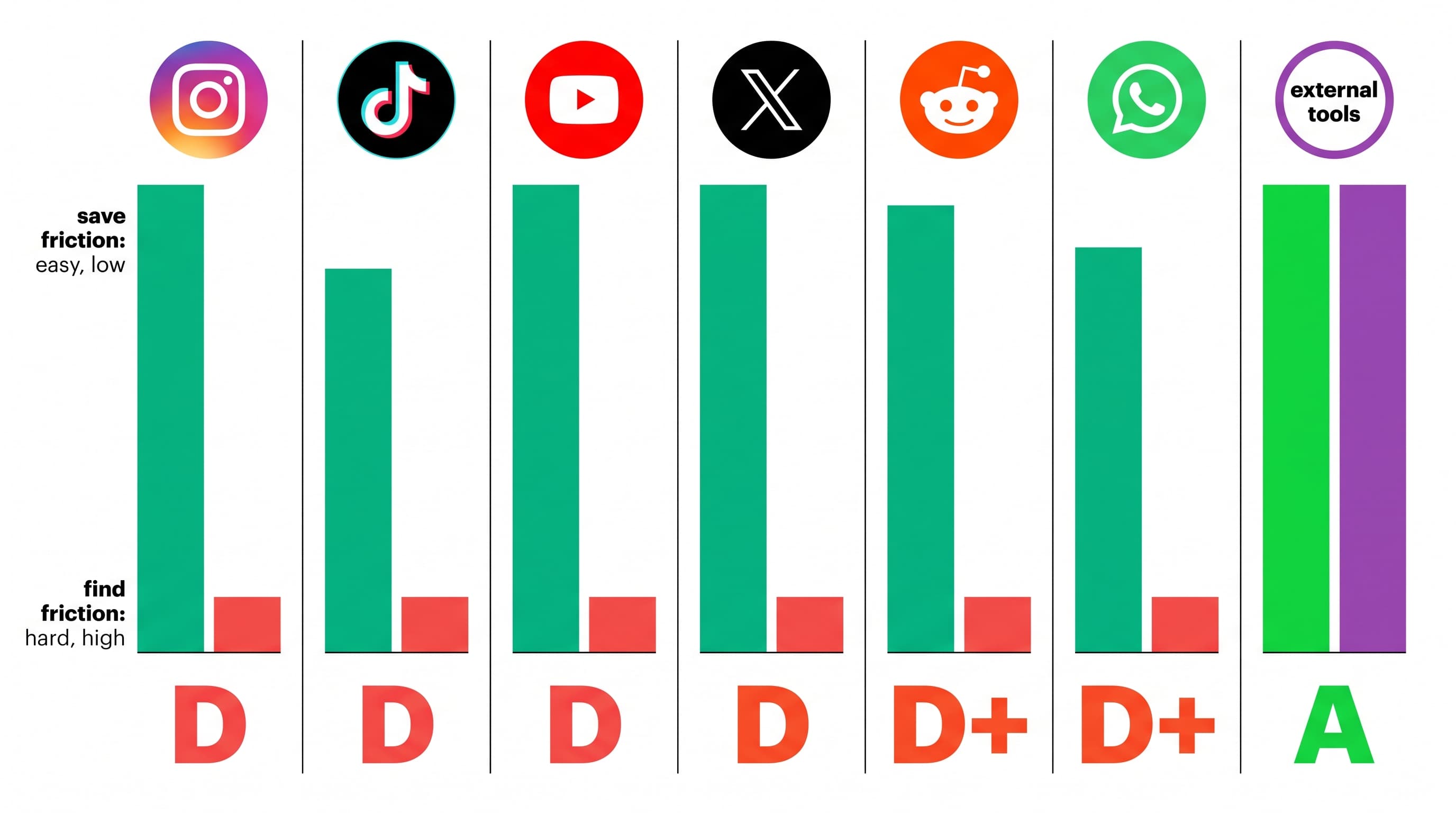
Every major platform has a save button. A bookmark icon. A "add to favorites." A heart-shaped wish list.
They all make saving effortless — one tap, done. But when you go back to find what you saved? That's where the experience varies from "acceptable" to "actively hostile."
We scored seven platforms on a simple framework: how hard is it to save something, and how hard is it to find it again?
The scoring method
Save friction (1-5, lower is better):
- 1 = one tap, zero decisions
- 3 = requires a choice (which folder/collection)
- 5 = requires app switch, copy-paste, or multi-step process
Find friction (1-5, lower is better):
- 1 = describe what you want, get it back instantly
- 3 = keyword search available, works for text
- 5 = scroll only, no search, no sort, no filter
Content understanding — does the platform know what's in your saved content?
- Full: indexes audio, visual content, and text
- Partial: indexes captions/titles only
- None: stores a pointer, understands nothing about content
Death risk — can your save disappear without warning?
- None: content is yours permanently
- Low: rare circumstances (platform shutdown)
- High: creator deletion, privacy change, or platform removal kills the save
The scorecard
| Platform | Save friction | Find friction | Content understanding | Death risk | Overall grade |
|---|---|---|---|---|---|
| Instagram Saved | 1 | 5 | None | High | D |
| TikTok Favorites | 1 | 4.5 | None | High | D |
| YouTube Watch Later | 1 | 4 | Partial (titles) | Medium | D+ |
| X (Twitter) Bookmarks | 1 | 4 | Partial (text only) | Medium | C- |
| Reddit Saved | 1 | 4.5 | None | Medium | D |
| WhatsApp (self-chat) | 2 | 3.5 | None | Low | C |
| Telegram (Saved Messages) | 1.5 | 3 | Partial (text search) | Low | C+ |
Not a single platform scores better than C+ on the find side. Let's break each one down.
Instagram: one-tap save, infinite-scroll find
Save: 1/5. Tap the bookmark. Done. Optionally long-press to file into a Collection (3/5 if you do).
Find: 5/5 friction. No search inside Saved. No keyword filter. No sort by date, account, or content type. No way to find a reel by what was said in it. The only controls: scroll, filter by post type (Reel/Photo/All), and browse Collections.
Content understanding: Zero. Instagram doesn't index the audio, on-screen text, or visual content of your saves for retrieval. The Explore search can find public posts by keyword — but that engine is completely walled off from your private saves.
Death risk: High. 31% annual loss rate from creator deletions, account privacy changes, and platform enforcement. Silent, no notification.
The verdict: Instagram is the worst combination possible: frictionless saving paired with impossible finding and high content loss. It's a graveyard generator.
TikTok: Instagram's problem, louder
Save: 1/5. Tap the bookmark (Favorites) or add to a Playlist.
Find: 4.5/5 friction. No search inside Favorites. Playlists offer some organization but have no search within them. The interface is a vertical scroll of thumbnails with no text preview. Slightly better than Instagram because videos show longer previews.
Content understanding: Zero. TikTok doesn't index video audio or on-screen text for your personal saves. Its recommendation engine understands content deeply — but that understanding is pointed at discovery, not your own library.
Death risk: High. Creator deletions, account bans (TikTok is aggressive about enforcement — 107 million actions in Q1 2026 in the EU alone), and the ever-present geopolitical risk of platform bans or shutdowns.
The verdict: Same fundamental problem as Instagram. Your personal video library has no search, no understanding of content, and high loss risk.
YouTube: the "Watch Later" lie
Save: 1/5. Tap "Save" → Watch Later or pick a playlist.
Find: 4/5 friction. Playlists have a search bar — but it only searches video titles and channel names. Not descriptions, not transcripts, not content. Watch Later has no search at all. If you saved a video because of something said at the 8-minute mark, you cannot find it by that topic.
Content understanding: Partial. YouTube generates full transcripts (auto-captions) for almost every video. But this transcript data is not searchable within your own Library or playlists. You can search all of YouTube by transcript via the main search — but you can't filter results to "only videos I've saved."
Death risk: Medium. YouTube videos are more persistent than Instagram posts (creators delete less often). But channel terminations, copyright strikes, and age restrictions can still kill saves.
The verdict: YouTube is the most frustrating case because the capability exists (full transcription) but is deliberately not applied to your personal library. The search gap is a product choice.
X (Twitter) Bookmarks: paywalled search
Save: 1/5. Tap the bookmark icon on any post.
Find: 4/5 friction (free) or 3/5 (Premium). Free users get a reverse-chronological list of bookmarks with no search, no sort, no filter. Premium subscribers get bookmark search and bookmark folders — which works for text-based content but doesn't help with images or video content in bookmarked posts.
Content understanding: Partial (text only). X can search the text content of bookmarked posts. But images, videos, and linked content within bookmarks are opaque.
Death risk: Medium. Post deletions by authors kill bookmarks. Account suspensions (growing on X) remove all content. But the churn rate is lower than Instagram because X culture involves less delete-and-repost behavior.
The verdict: X is the only platform that gates bookmark search behind a paywall ($8/month via Premium). The free experience is nearly as bad as Instagram.
Reddit: saved and forgotten
Save: 1/5. Tap "Save" on any post or comment.
Find: 4.5/5 friction. Saved items are a flat chronological list. No search within saves. No folders, no categories, no sort. Reddit's main search doesn't filter to "only my saves." The list mixes posts and comments in a single stream.
Death risk: Medium. Reddit posts persist longer than Instagram/TikTok (less delete culture), but moderator removals, subreddit bans, and account deletions can still orphan your saves.
The verdict: Reddit's save feature feels like an afterthought that was never iterated on.
WhatsApp (self-chat): good save, okay find
Save: 2/5. Open the chat, type/forward/share. Slightly more friction than a one-tap bookmark because you need to open the specific conversation.
Find: 3.5/5 friction. WhatsApp has keyword search that works for text messages. It does not work for photos, voice notes, videos, or link content. If you remember exact words you typed, you can find it. If you sent a photo or voice note, you're scrolling.
Content understanding: None. Photos are opaque to search. Voice notes are unsearchable audio files. Forwarded links are searchable only by the URL text, not the page content.
Death risk: Low. Your self-chat content doesn't depend on other users' decisions. The main risks are media expiration (WhatsApp purges old media from servers) and backup failures.
The verdict: WhatsApp is actually the least-bad platform for retrieval — but only for text. For all other formats (photos, voice, video), it's as blind as Instagram.
Telegram: the closest to adequate
Save: 1.5/5. Forward to "Saved Messages" or use the bookmark feature. Slightly more friction than a native bookmark because forwarding requires a tap-and-confirm.
Find: 3/5 friction. Telegram's Saved Messages has full-text search that works well for text content. You can search messages by keyword, date, and sender. It also supports hashtags within Saved Messages for manual categorization.
Content understanding: Partial. Text is fully searchable. Files are searchable by filename. But photo content, voice note audio, and video content remain opaque to search.
Death risk: Low. Saved Messages are stored on Telegram's cloud servers and persist across devices. Content doesn't depend on another user's account status (since you've forwarded it to yourself, it persists even if the original sender deletes it).
The verdict: Telegram is the closest any major platform gets to a functional save-and-find system. But it still fails on non-text content — the same gap that affects everything else.
The pattern that explains everything
Notice what every platform has in common:
- Saving is effortless (all scored 1-2)
- Finding is painful (all scored 3-5)
- No platform understands non-text content (no "Full" in the content understanding column)
This isn't coincidence. It's incentive alignment.
Frictionless saving generates engagement signals (the save tells the algorithm you valued the content). Painful finding keeps you on the platform longer (you scroll, you browse, you see ads). Understanding content would enable quick retrieval that ends sessions.
Platforms are optimized for your behavior as data, not for your data as useful to you.
What closes the gap
The tools that actually solve this sit outside the platforms. They capture content at save time, understand what's in it (text, audio, video), and retrieve by description rather than keyword.
Pell does this by living inside your existing chat apps — WhatsApp and Instagram. The save gesture is the same: share/forward/message. But the content is indexed by meaning, not just by the fact that you saved it.
The scorecard for Pell as a save-and-find system:
| Metric | Score |
|---|---|
| Save friction | 1 (same as messaging a friend) |
| Find friction | 1.5 (describe what you want, get it back) |
| Content understanding | Full (audio, video, image, text) |
| Death risk | None (content captured, not pointed to) |
No app. No account. No organizing. Just save and find.
Frequently asked questions
Which platform has the best save-and-find experience? Among major platforms, Telegram is the closest to adequate — it offers full-text search within Saved Messages. But even Telegram fails for non-text content (photos, voice notes, video). No major social or messaging platform offers search by what's inside media content.
Why don't platforms add search to saved content? Because efficient retrieval shortens user sessions. Every platform's revenue model depends on time spent in the app. A save that's easy to find means a user who retrieves and leaves. A save that's hard to find means a user who stays, scrolls, and sees more ads.
Can I search Instagram saved posts by keyword? No. As of August 2026, Instagram's Saved tab has no search, no sort, and no filter. You can only browse chronologically or within named Collections. Instagram's main search operates on all public content but cannot be filtered to your personal saves.
Do saved posts disappear on all platforms? On platforms where saves are pointers (Instagram, TikTok, Reddit, X), yes — saves disappear when the original content is deleted. On platforms where you forward/copy content to yourself (WhatsApp self-chat, Telegram Saved Messages), saves persist regardless of the original sender's actions.